Losing your house keys or fumbling to unlock the door in the dark is more than just annoying – it’s outdated. With the best keyless deadbolts, you can step into the future of home security. These smart locks use fingerprints, keypads, or Wi-Fi control to let you in effortlessly while keeping intruders out.
Whether you’re upgrading your home, securing a rental, or managing Airbnb access, keyless deadbolts are an easy and reliable solution. Below, we’ve reviewed the 7 best keyless deadbolts in 2025- chosen for security, smart features, and value.
If you prefer simple keypad-only options, check out our detailed guide on the Best Keypad Deadbolts
Disclosure: Some links in this article are affiliate links. This helps support us at no extra cost to you.
As an Amazon Associate, I earn from qualifying purchases.
Table of Contents
Best Overall for Smart Homes:
1.Veise Fingerprint Door Lock

- Fingerprint Unlock with Self-Learning AI: Store up to 20 fingerprints and let your whole family enter seamlessly without…
- [4-in-1] Unlock: Store up to 20 fingerprints and 20 passwords for keyless family entry, keep two spare mechanical keys, …
- Multiple Password Types: The secure Master Password is reserved for you, the owner. Create up to 20 individual User Pass…
- Security Locking: “Smart Door Locking” – The KS02A door lock auto-locks in 10-99 seconds; Press and hold any key for 2 s…
- Long Battery Life & Low Battery Alert: With long battery life and a low-power warning; runs for up to 365+ days on 4 AA …
Rated 4.4/5 by over 4,252 users
Key Features
- Fingerprint + keypad + key access
- Auto-lock and anti-peeking password
- Satin nickel finish with weather-resistant design
- Simple DIY installation
Why We Recommend It: The Veise Fingerprint Door Lock blends convenience with top-notch security. You can unlock using your fingerprint, a PIN, or a mechanical key backup. Its anti-peeking feature prevents unwanted access, and the auto-lock ensures your door is never left open. A perfect all-rounder for any smart home.
Pros
- Fast fingerprint unlock (0.3 seconds)
- 4-in-1 access (fingerprint, PIN, key, one-time codes)
- Auto-lock feature (10-99 seconds)
- Easy DIY installation (15-50 minutes)
- Weather resistant (-31°F to 158°F)
- 1-year warranty + excellent customer service
Cons
- No Wi-Fi/app support; fingerprint issues with wet hands
- Needs 4 AA batteries (not included)
- Max 20 users only
- Possible door frame adjustment required
Best For: Hands-free convenience with multiple family members and easy DIY installation.
Best Wi-Fi Connected:
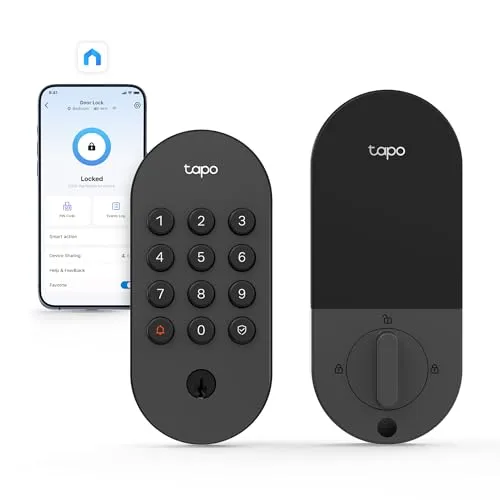
2.Tapo Smart Wi-Fi Deadbolt

- SMART WI-FI DEADBOLT DOOR LOCK: Convenient and secure, the DL100 provides certified, durable deadbolt security with thou…
- MULTIPLE WAYS TO UNLOCK: Keyless keypad, energy-efficient Bluetooth for nearby access, remote Wi-Fi via the Tapo App, vo…
- CONVENIENT & SECURE ACCESS FOR ALL: Manage access effortlessly by creating groups for family, guests, or visitors in the…
- KEYLESS TACTILE BUTTONS: Skip the hassle of keys with up to 200 customizable codes. Our smart lock features a backlit ke…
- AA BATTERY POWERED: Lasts up to 200 days in Wi-Fi mode or 300 days in Bluetooth mode. Includes easy battery replacement …
Rated 4.5/5 by over 167 users
Key Features
- Wi-Fi-enabled with in-app monitoring
- Tactile backlit keypad
- IP54 weatherproof and BHMA Grade 3 certified
- Works with standard U.S. doors
Why We Recommend It: The Tapo Smart Wi-Fi Deadbolt lets you control and monitor your door from anywhere. Through the Tapo app, you can assign codes, check history logs, and set auto-lock timers. It’s a solid choice for anyone who loves hands-on control from their smartphone.
Pros
- Easy installation (no extra drilling)
- Multiple unlock methods (app, keypad, voice, keys)
- 200-300 days battery life
- Smooth deadbolt operation
- Real-time notifications & activity logs
- 200+ custom codes
- Auto-lock feature
- Excellent Alexa/Google integration
- BHMA Grade 3 certified + IP54 weatherproof
- Great value vs competitors
Cons
- Notifications may drop occasionally, fixed by reinserting battery
- Requires app calibration after installation
- Tapo app includes occasional pop-up ads
- Instructions lack clear calibration guidance
Best For: Smart homes that want maximum security without complexity.
Best Budget-Friendly:
3.TEEHO TE002 Fingerprint Door Lock

- 4 Ways to Unlock: Store up to 20 fingerprints and 20 passcodes, plus 2 physical keys and one-time PINs that auto-delete …
- Fast & Smart Fingerprint Access: Our AI-powered fingerprint sensor unlocks your door in 1 second, recognizing prints in …
- Convenient Auto & One-Touch Lock: Automatically locks 10–99 seconds after closing (It is off by default, but can be manu…
- Long Battery Life & Low Battery Indicator: Powered by 4 AA batteries (not included), lasts up to 365 days. A red light i…
- Silent & Away Modes for Peace of Mind: Switch to silent mode to lock and unlock quietly—perfect for nighttime use or sle…
Rated 4.4/5 by over 11,715 users
Key Features
- Fingerprint + keypad + mechanical key
- Auto-lock and one-touch lock
- Satin nickel finish
- Easy DIY setup
Why We Recommend It: TEEHO’s TE002 is ideal for homeowners seeking a high-quality biometric lock at an affordable price. The fingerprint sensor is fast and accurate, while the backlit keypad is great for nighttime use. With easy installation and reliable auto-lock, it delivers excellent value for the price.
Pros
- Easy installation – Takes under an hour, just screwdriver needed
- Multiple entry methods – Fingerprint, keypad, and mechanical key
- Fast unlock – 0.3 second fingerprint recognition
- Smart features – Auto-lock, one-time codes, anti-peeping password
- Long battery life – 300+ days with 4 AA batteries
- Weather resistant – IP54 waterproof rating
Cons
- Fingerprint performance varies and may struggle with cold or wet fingers
- Lockout after failed attempts affects both fingerprint and keypad
- Some plastic parts mixed with aluminum build
- No smart connectivity (no Wi-Fi/app)
Best For: Budget-conscious homeowners seeking affordable biometric security with easy DIY installation.
Best Bluetooth Smart Lock:
4.Wyze Auto-Lock Bolt Fingerprint
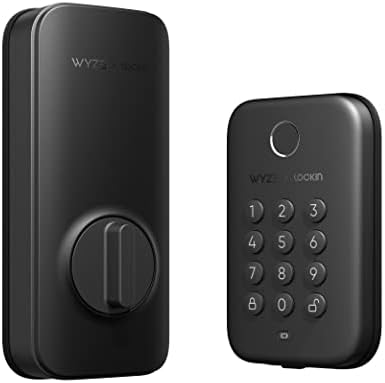
- WYZE LOCK BOLT SMART LOCK AND KEYPAD SYSTEM
Rated 4.5/5 by over 3,072 users
Key Features
- Bluetooth control with app scheduling
- Fingerprint + keypad access
- IPX5 weatherproof and BHMA rated
- UL 20-min fire-rated
Why We Recommend It: The Wyze Auto-Lock Bolt offers smart security without the Wi-Fi setup. Its Bluetooth app gives you in-depth control, while fingerprint and keypad access add flexibility. With robust construction and auto-lock, it’s one of the safest Bluetooth deadbolts for everyday use.
Pros
- Fast 0.5-second fingerprint unlock
- No physical keyhole (bump key proof)
- Anti-peep keypad technology
- Easy 20-minute installation
- Auto-lock with custom timing
- 6+ months battery life (4 AA)
- BHMA certified & UL fire-rated
- IPX5 weatherproof
- Access history tracking
- One-time emergency codes
Cons
- Loud operation; fingerprint struggles with wet or dirty fingers
- Bluetooth-only, no Wi-Fi or remote access
- No key backup or door open/close sensor
- Plastic interior parts; requires 4 AA batteries and lockout risk if malfunctioning
Best For: Budget-conscious homeowners who want keyless entry security without Wi-Fi complexity or key vulnerability risks.
Best for Airbnb and Rental Properties:
5.Ulecoce Keyless Entry Keypad Deadbolt

- Latest Instruction Manual: Uploaded on the product page – refer to it before installation and use for accurate operation…
- Flexible Access Management: Store up to 100 user codes and generate one-time passcodes for cleaners, pet sitters, or gu…
- Smart Auto-Lock & One-Touch Lock: This smart door lock’s custom 5–60s auto-lock timer prevents forgotten locks (great fo…
- ANSI/BHMA Grade 3 Security Protection: This keyless entry door lock features anti-peek virtual codes (blocks shoulder su…
- IP54 Weatherproof Durability: The zinc-alloy body of this deadbolt lock resists dust/moisture for indoor/outdoor use (p…
Rated 4.3/5 by over 1,017 users
Key Features
- Auto-lock and one-touch locking
- Supports 100 unique access codes
- Fits standard U.S. front doors
- Sleek black finish with matching handle
Why We Recommend It: This Ulecoce Keypad Deadbolt is tailor-made for Airbnb hosts or multi-user environments. It allows you to generate up to 100 codes for guests or staff, making key management effortless. The one-touch lock and auto-lock functions make check-ins completely hassle-free.
Pros
- Easy 15-minute DIY installation
- 100 user codes + one-time passcodes
- Auto-lock (5-60 seconds) & one-touch locking
- ANSI Grade 3 security with anti-peek technology
- IP54 weatherproof rating
- Perfect for Airbnb & multi-user environments
- 3-year warranty + 24/7 support
Cons
- Limited connectivity (no smartphone app or Wi-Fi)
- Batteries drain fast and require frequent replacement
- Grade 3 security and no fingerprint access despite some claims
Best For: Airbnb hosts, busy homeowners, and multi-user environments needing hassle-free keyless access management.
Best App-Controlled:
6.Ulecoce Fingerprint Keypad Deadbolt

- Latest Instruction Manual: The latest version is now available on the product page. Please review it before installation…
- Fingerprint Smart Door Lock: Experience an ultra-fast and effortless unlocking process, perfect for when you’re coming h…
- App Control: This keyless entry door lock with handle offers superior remote management. Generate temporary passwords fo…
- 5-in-1 Unlocking Methods: In addition to supporting up to 512 combined fingerprint and keypad passcode entries, this loc…
- Auto-Lock & One-Touch Lock: Enhance your home security with the customizable auto-lock function, which can be set to eng…
Rated 4.4/5 by over 732 users
Key Features
- App + fingerprint + keypad control
- Auto-locking and remote management
- Durable matte black finish
- Simple installation on standard doors
Why We Recommend It: Combining biometric, keypad, and app control, this lock delivers security with convenience. You can manage access remotely, track entries, and enjoy quick auto-lock features. It’s stylish, reliable, and ideal for busy households or smart home enthusiasts.
Pros
- Fast fingerprint unlock (0.3 seconds, 99.99% accuracy)
- 5 unlock methods (fingerprint, keypad, app, one-touch, key)
- Easy DIY installation (20 minutes with screwdriver)
- Auto-lock feature (5-60 seconds customizable)
- Remote app control (generate codes, unlock remotely)
- High storage (50 fingerprints, 100 codes)
- Emergency charging port outside door
- 3-year warranty with 24/7 support
Cons
- Limited Bluetooth range (around 50 meters)
- Matte black finish can heat up in direct sunlight
- Requires regular charging
- Possible connectivity issues in extreme weather conditions
Best For: Tech-savvy homeowners and busy families who want keyless convenience with multiple unlock options and remote access control.
Best Fully-Connected Smart Deadbolt:
7.YHV Keyless Entry Smart Door Lock

- Multi-access Unlock: The YHV smart lock CA02 offers 6 unlocking options like biometric fingerprint recognition, App, pas…
- Stable and Efficient Fingerprint Sensor: Unlock your door in just 0.3 seconds with cutting-edge fingerprint recognition….
- Voice Control Convenience: Works seamlessly with Alexa and Google voice control, control your smart door lock with your …
- App Remote Control: The App offers seamless control of your wifi door lock from anywhere. You can lock and unlock your d…
Rated 4.9/5 by over 194 users
Key Features
- Wi-Fi + fingerprint + keypad
- Built-in Alexa and Google Assistant support
- IP54 weatherproof
- 10-month battery life and auto-lock
Why We Recommend It: This smart Wi-Fi deadbolt stands out for its integration with Alexa and Google Assistant. It offers remote app access, voice control, and biometric security in one modern package. Perfect for those who want a truly hands-free experience.
Pros
- 6 unlock methods – Fingerprint, keypad, app, voice, key, Type-C emergency power
- Fast fingerprint – 0.3 seconds with 99% accuracy
- Built-in WiFi – No hub required for remote access
- Voice control – Works with Alexa and Google Assistant
- 10-month battery life – Up to 8 AA batteries included
- Auto-lock feature – Never forget to lock again
- Easy installation – 15-20 minutes, no extra drilling
- Weather resistant – IP54 rating for durability
- 50 fingerprints/codes – Storage for multiple users
Cons
- Works only with 2.4GHz Wi-Fi; remote features depend on stable internet
- Uses 8 AA batteries (not included)
- Larger size may not suit all door types; features can feel complex for beginners
- Higher price than basic smart locks
Best For: Tech-savvy homeowners who want a fully integrated smart home security solution with multiple unlock methods and remote access capabilities.
Buying Guide: How to Choose the Best Keyless Deadbolt
1. Lock Type
Choose between fingerprint, keypad, or Wi-Fi-enabled locks. Fingerprint models are fast and secure, while Wi-Fi or Bluetooth options let you monitor access remotely.
2. Security Ratings
Look for BHMA certification and IP-rated weatherproofing to ensure durability and resistance to tampering.
3. Auto-Lock Feature
This ensures your door locks automatically after entry or exit- a must-have for families and Airbnb hosts.
4. Smart Integrations
If you use Alexa or Google Home, pick a lock that supports voice control and in-app management.
5. Battery Life & Backup
Most keyless deadbolts run on AA batteries and include mechanical keys as a backup. Choose one with at least 6–10 months of battery life.
Upgrading your entire entry setup? Explore our latest review on Entry Door Knobs to match your new lock perfectly.
FAQs
Are keyless deadbolts safe?
Yes. Most keyless deadbolts use advanced encryption and tamper-proof materials, often safer than traditional keys.
Do keyless locks work without Wi-Fi?
Yes. Fingerprint and keypad models work offline. Wi-Fi adds remote monitoring and app control.
How long do batteries last?
Typically between 6 to 12 months depending on usage and features.
Can I use a keyless lock for Airbnb or offices?
Absolutely. Many models support multiple user codes or app-based access, making them ideal for rentals and business use.
Own an RV? You’ll love our complete guide to RV Entrance Door Locks with Deadbolt.
Conclusion
Upgrading to a best keyless deadbolts brings peace of mind, convenience, and modern style to your entryway. Whether you want fingerprint recognition, smart Wi-Fi control, or a simple keypad lock, these 7 options offer the best in 2025.
Ready to secure your home? Explore the best keyless deadbolts above and enjoy smarter, safer living.
Prefer a smart knob instead? Discover our picks for the Electronic Door Knobs.
👉 Click here to see the Best Keyless Deadbolts available on Amazon.